
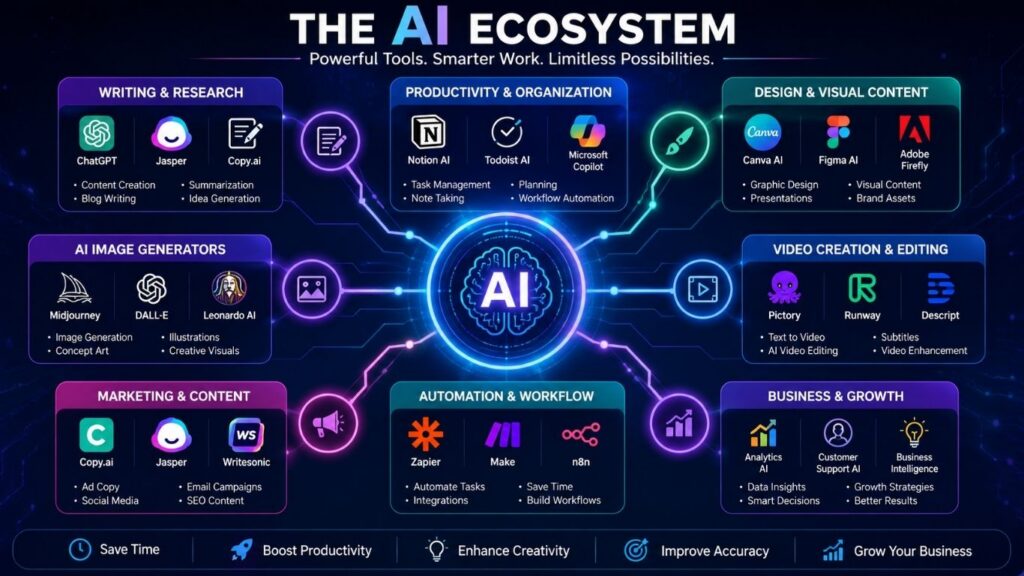
Discover • Compare • Learn • Use
Your Practical Starting Point for AI Tools
Find AI tools by purpose, understand what they do, and choose options that fit your workflow, budget, and goals.
The AIToolSee discovery path
Start with a goal, discover an application, explore the task-focused tool, then learn the workflow. Each layer answers a different question.
5. Use Cases — the bridge between goals and tools
Use cases describe the job to be done. They connect the goal a visitor expresses in the Finder with the task-focused AI Tools and the applications that can perform that work.
Choose your next step
Explore AI Tools by Goal
Productivity & Work
Writing, planning, notes, meetings, automation, and everyday workflows.
Marketing & Business
Content, campaigns, customer support, research, and business operations.
Content & Creativity
Images, video, design, presentations, writing, and creator workflows.
Education & Research
Research, literature discovery, summaries, study support, and knowledge work.
SEO & Growth
SEO research, optimization, content strategy, and search visibility workflows.
AI Assistants & Chatbots
Conversational AI and general-purpose assistants for work, learning, and creation.
Featured AIToolSee Guides
AI Tools for Small Businesses
Build a practical AI stack without collecting unnecessary subscriptions.
AI Tools for Productivity
Explore tools for smarter writing, planning, notes, summaries, and daily work.
AI Image Generators
Compare practical options for creating visuals, concepts, and digital artwork.
How AIToolSee Helps You Choose
Before choosing a tool, define the deliverable you need and the constraints that matter: budget, privacy, language support, integrations, and the quality threshold for the final output. Use the AI App Finder to identify a starting point, then verify the tool’s current features and limits on its official website.
- Test the real task: run one representative prompt or workflow before committing.
- Check the boundaries: confirm free-plan limits, export options, privacy terms, and whether important features require payment.
- Compare the output: judge accuracy, editing effort, consistency, and fit for your actual deliverable.
Then use the relevant AI app profile for product-specific context or open the AI guides and tutorials for practical workflows.
1. Start With the Use Case
Define the result you need before choosing a product. The same AI capability can be useful in very different workflows.
2. Compare Practical Fit
Consider features, limitations, pricing, learning curve, integrations, and the type of work you actually need to do.
3. Learn Before You Commit
Use tutorials and examples to understand the workflow, then revisit your choice as AI products evolve.
Use the Hub in 3 Simple Steps
1. Start With Your Goal
Choose the type of work you want to improve instead of starting with a long list of products.
2. Explore the Category
Open a focused category to discover tools grouped around a practical use case.
3. Learn Before You Choose
Use AIToolSee guides and comparisons to understand capabilities, limitations, pricing, and workflow fit.
What You Can Expect From AIToolSee
Practical discovery, clearer comparisons, and learning resources designed around real AI workflows.
Use-Case First
Start from the outcome you need, then discover relevant tools.
Practical Context
Understand where a tool fits, what it can do, and where its limits matter.
Learning Resources
Move from discovery to action with tutorials, examples, and workflows.
Continue Exploring AIToolSee
AI Guides & Tutorials · AI News & Trends · AI Resources & Insights
Quick checklist: evaluate an AI tool before relying on it
- Define one real task. Write down the input you can provide and the output you need.
- Run a representative test. Use the same task and evaluation criteria when comparing alternatives.
- Check the result. Verify factual accuracy, completeness, tone, formatting and the amount of human correction required.
- Confirm practical constraints. Check current pricing, usage caps, export formats, integrations, privacy terms and commercial-use conditions on the provider’s official site.
- Decide from evidence. Keep the tool only if its output quality and time saved justify its cost and risks.
For a goal-first starting point, visit the AI App Finder; to compare product-specific context, browse the AI Apps directory; for task-led examples, explore AI Use Cases and the AI Guides & Tutorials.
Frequently asked questions
How do I choose between two AI tools?
Test both on the same representative task. Compare quality, correction time, reliability, privacy, integration needs and total cost rather than relying only on feature lists.
Can I trust an AI-generated answer without checking it?
No. Verify important claims against reliable primary sources and review outputs for errors, missing context, bias and rights issues before using them.
Are free AI plans enough for regular work?
It depends on usage limits, output requirements and the task. Check the current free-plan caps and paid features before building a workflow around a tool.
Does AIToolSee guarantee that a tool is the best choice?
No. AIToolSee provides practical discovery and evaluation guidance. The best fit depends on your task, constraints and the results you verify yourself.